Title here
Summary here
A good prompt can be the difference between an app that almost works and one that does exactly what you need. Leave too much open to interpretation and Nova will make an educated guess, which usually means extra rounds of edits before you land on the right result.
Start small, add detail as you go, and if you get stuck, use Nova’s built-in tools to help you sharpen the rest. You’ll spend less time rewording and more time publishing apps, websites, and tools.
The Improve Prompt button is Nova’s built-in prompt assistant. It takes your current prompt and transforms it into structured information that is ready for AI development. This way, Nova can fill in any gaps in your request before you start building, saving you time and credits.
To get started, type your prompt in Nova’s prompt text box and click Improve Prompt.
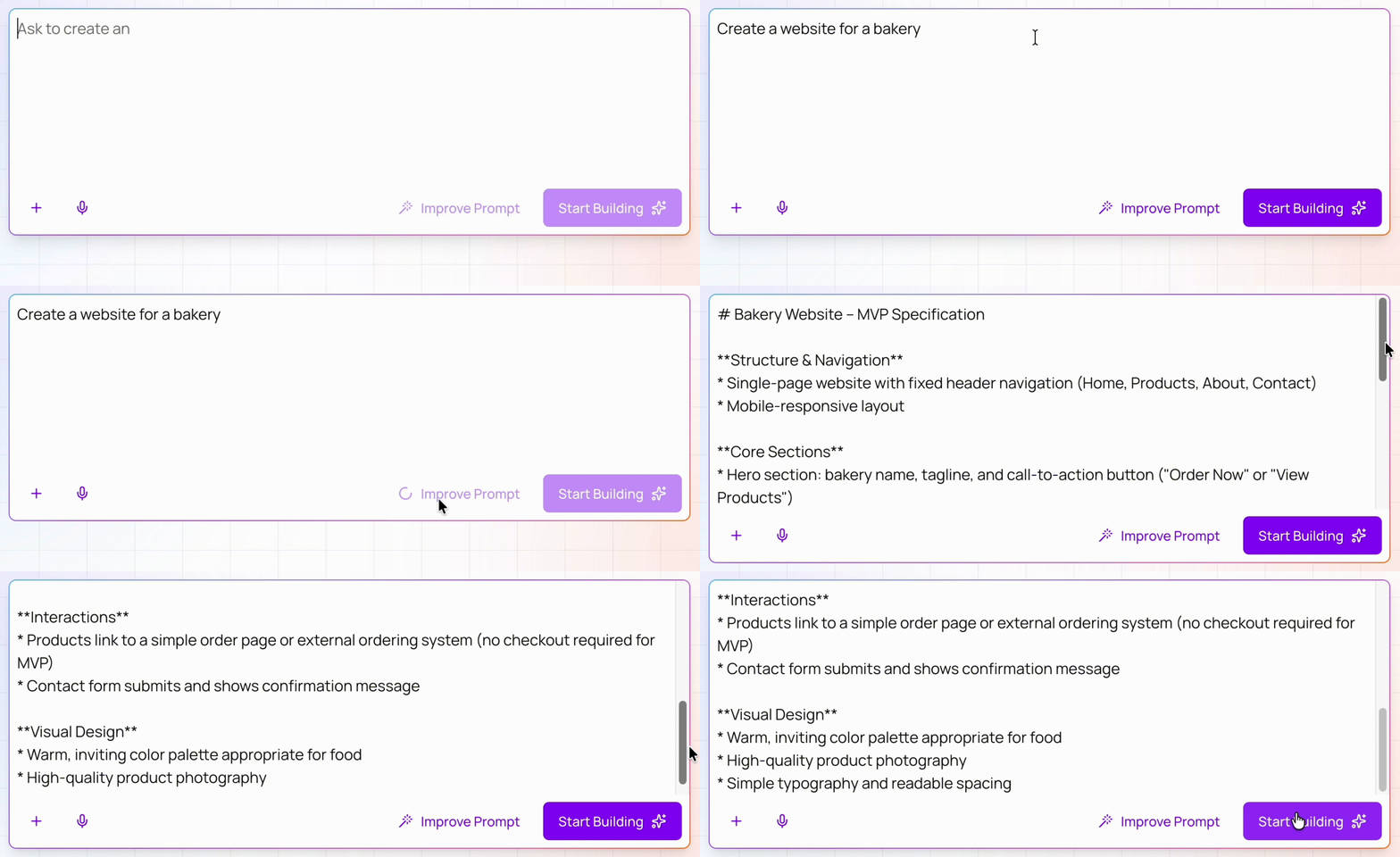
You can also ask Nova to request more details before it builds your project. Add a sentence like “Ask me any clarifying questions you need” to the end of your prompt.
The better you define your idea, the fewer assumptions Nova has to make. Identify specific features and requirements upfront. You can start by breaking down your idea into three parts:
A weak prompt is vague and lacks structure. Nova will guess your layout requirements, feature set, and business logic.
Create a website for a bakery.A strong prompt reads as a blueprint of the product you are building. This clarity helps Nova build the specific result you want.
Build a website for a local bakery. Include a homepage hero section with an "Order Now" call-to-action, a menu page organized by categories (breads, pastries, and custom cakes) with item prices, a location page with an embedded map and operating hours, and a contact form for catering requests.Think of the people who will use your app. When Nova understands your user base, it can make choices to match your users’ needs.
Describe the people who will open the app, what they are trying to do, and the conditions around them. A first-time customer has different needs than an experienced employee who uses your app all day. You can create a clear description of your audience by answering these questions:
A weak prompt does not include specific details about your users. Nova assumes important information and the result might not meet user expectations.
Make an inventory app for retail store workers so they can check stock in the back room.A strong prompt gives Nova a clear picture of the user and their context. Nova will build a solution that solves their specific problem.
Build an inventory lookup tool for retail associates on the sales floor. They use handheld tablets while actively talking to customers, so the UI needs an easy-to-use search feature, color-coded stock levels (green/red), and large tap areas to prevent mistakes while walking.Describe the ideal “look and feel” of your app in your prompt. Nova uses this information to set the colors, layout, and visual direction of your project.
You do not need design jargon to do this well. Even simple phrases like “clean and modern” or “calm and professional” are great context. You can describe style in three parts:
A weak prompt gives almost no visual direction. Nova will fill in the gaps with default design choices that may not match your brand or your users’ needs.
Make a daily schedule app for my puppy. Make it look good and professional.A strong prompt gives Nova enough direction to shape the interface around your goals. The result will be closer to the look you want on the first pass.
Build a daily schedule and training tracker for a puppy. Use a "playful" and approachable visual tone with soft rounded corners and a pastel color palette. Apply a single-page timeline layout that is mobile-first, using large, easy-to-tap buttons for logging meals and naps.Buzzwords are a great way to quickly narrow down the style of your application. Use common terms like “minimal”, “bento”, “premium”, or “playful” to instantly influence the UI layout, typography, and spacing of your project.
Real content includes the words, numbers, labels, or messages that people will see in your app. For example, you can paste product names, event details, or sample records into your prompt. This helps Nova make better decisions while it builds and exposes problems early.
If you do not have final copy yet, use realistic stand-ins. Pick examples that match the length, tone, and complexity of the content you plan to use later.
A weak prompt uses placeholder text and vague examples. Nova cannot judge spacing, hierarchy, or edge cases from generic content.
Add three upcoming events to the app. Use lorem ipsum for the event descriptions.A strong prompt gives Nova realistic scenarios and enough detail to shape the interface around them.
Populate the event booking app with three common scenarios my business handles. Scenario 1: A multi-day music festival with a long list of headline artists and multiple ticket tiers. Scenario 2: A local circus performance with a "Sold Out" badge and disabled ticketing buttons. Scenario 3: A rock concert with a countdown timer and a prominent call-to-action to buy tickets.